
A study in TrialPilot starts as a draft: a private working record you configure in the Study Builder before anything is visible to participants. The builder walks the whole protocol — design, cohort, assessments, interventions, consent, and regulatory profile — and validates it before you publish.
This page covers creating a study and the two tabs that define the core protocol record: Protocol and Participants. The other tabs each have their own guide, linked from the table below. To skip the blank-page start entirely, begin from a curated study template.
Create a study#
- Make sure the correct organization is active.
- Select Create Study from the no-studies prompt or Organization > Studies.
- Enter the study name.
- Select Create Study.
Study names can be up to 50 characters and are visible to participants, so name the study the way you want it to appear in the app. After creation, TrialPilot opens the Study Builder for that study. New studies begin in draft status and can be configured freely before publishing.
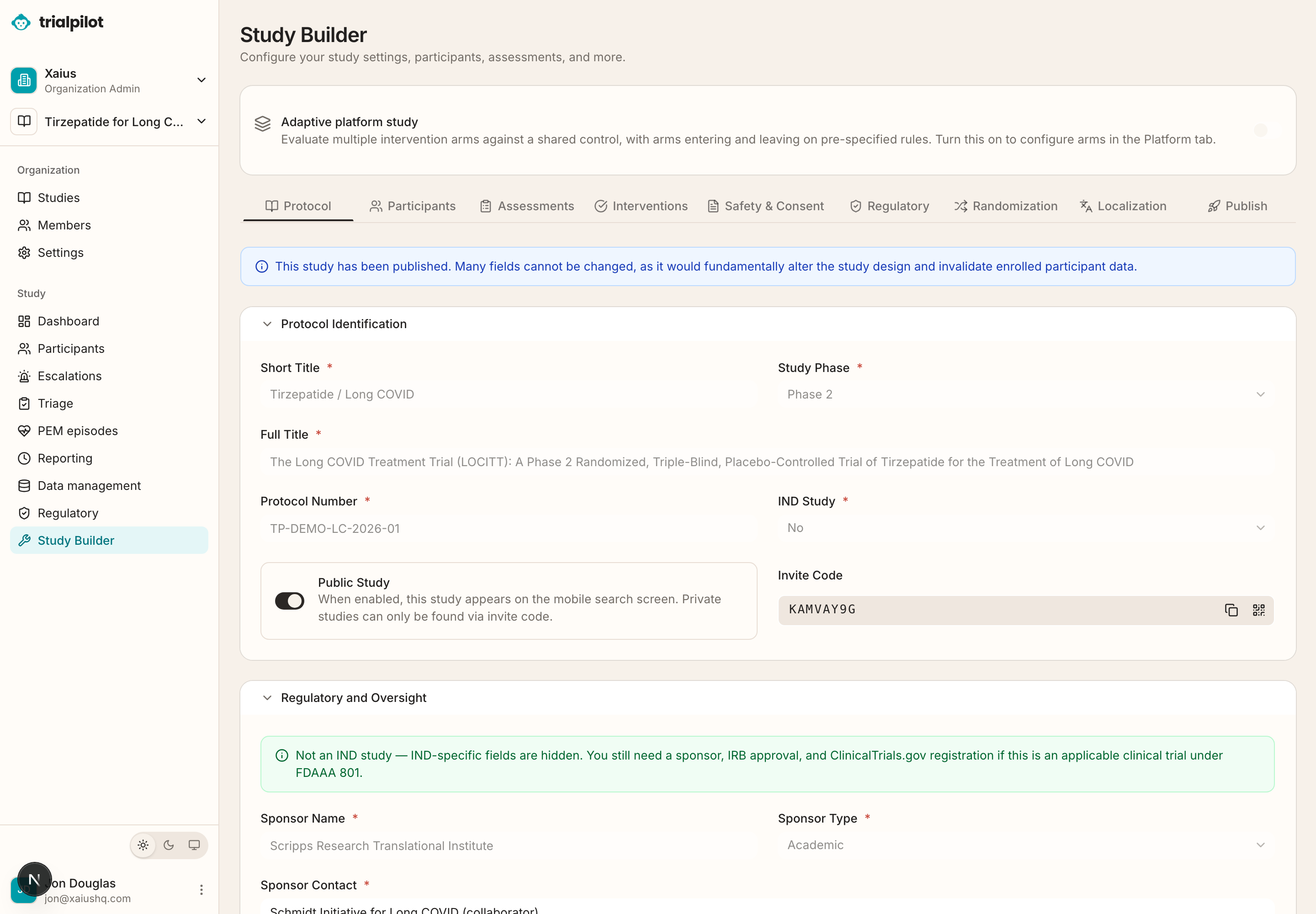
Working in the Study Builder#
Each tab saves independently. When you leave a tab with unsaved changes, TrialPilot asks whether you want to save, discard, or cancel — so you never silently lose edits or silently keep them.
Published studies lock some fields
| Tab | What it configures |
|---|---|
| Protocol | Identification, study design, durations, study team, objectives and endpoints, and regulatory-oversight fields. Covered in depth below. |
| Participants | Sample size, per-arm size, and inclusion, exclusion, and withdrawal criteria. Covered in depth below. |
| Assessments | The instruments and schedules that become participant tasks. See Assessments and schedules. |
| Interventions | The study product, comparator, administration details, and dose escalation. See Interventions and dosing. |
| Safety & Consent | eConsent content, central IRB / ethics information, and safety definitions. See Consent and ethics setup. |
| Regulatory | The reporting regime: regulatory type, IND/IDE numbers, reporting windows, and red-flag rules. These settings drive the regulatory workspace and safety workflows later. |
| Randomization | Arms, allocation, and blinding controls. Appears for randomized controlled, crossover, and factorial designs. See Randomization and blinding. |
| Platform | Platform arms, allocation weights, and governance settings. Appears when the adaptive platform option is turned on. See Adaptive platform studies. |
| Localization | Authoring and target languages for participant-facing content. Covered briefly below. |
| Publish | Validation review and the publish action. See Publish and recruit. |
The Protocol tab#
Use Protocol to define the core study record.
Identification#
Protocol identification includes the short title, study phase, full title, protocol number, IND study status, and the study's invite code.
Study design#
- Design type: randomized controlled, single arm, crossover, factorial, or observational.
- Blinding: open label, single blind, or double blind — whether participants and the study team know who receives which intervention.
- Control type: placebo, active comparator, standard of care, or no control.
- Randomization ratio, such as 1:1.
- Total study duration and per-participant duration — how long the study runs overall versus how long each participant is enrolled.
- Intervention start delay.
- Wearable baseline duration.
The wearable baseline can be off or set to a defined number of days of pre-intervention wearable data collection. Longer baselines can improve analysis, but may increase participant burden — a real tradeoff for energy-limited populations.
Study team#
Record the principal investigator, clinical project manager, medical monitor, and study coordinator.
Objectives and endpoints#
Define the primary objective, primary endpoint, secondary objectives, exploratory objectives, and safety objective. An endpoint is the specific measured outcome that answers an objective — for example, change from baseline in a named instrument score.
Regulatory and oversight fields#
Regulatory and oversight fields include sponsor information, responsible party details, NCT number, FDA serial number, and protocol version metadata.
The Participants tab#
Use Participants to define the planned cohort. You can set:
- Total sample size.
- Per-arm sample size for randomized designs.
- Inclusion criteria.
- Exclusion criteria.
- Withdrawal and discontinuation criteria.
For randomized designs, the dashboard shows ratio and power-calculation context based on the sample size inputs, so you can sanity-check whether the planned cohort supports the planned analysis.
Localization#
Use Localization to manage authoring and target languages for participant-facing study materials. You can save localization settings, validate coverage across languages, and publish localized content. Configure localization before the publish review when your study recruits in more than one language.
Next: add the assessments and schedules that turn this protocol into participant tasks, or rehearse the whole thing in test mode.